
The essentials
You need an existing gameserver with an accessible RCON interface. Frontline CRCON is the management application; it does not replace the gameserver or its hosting agreement.
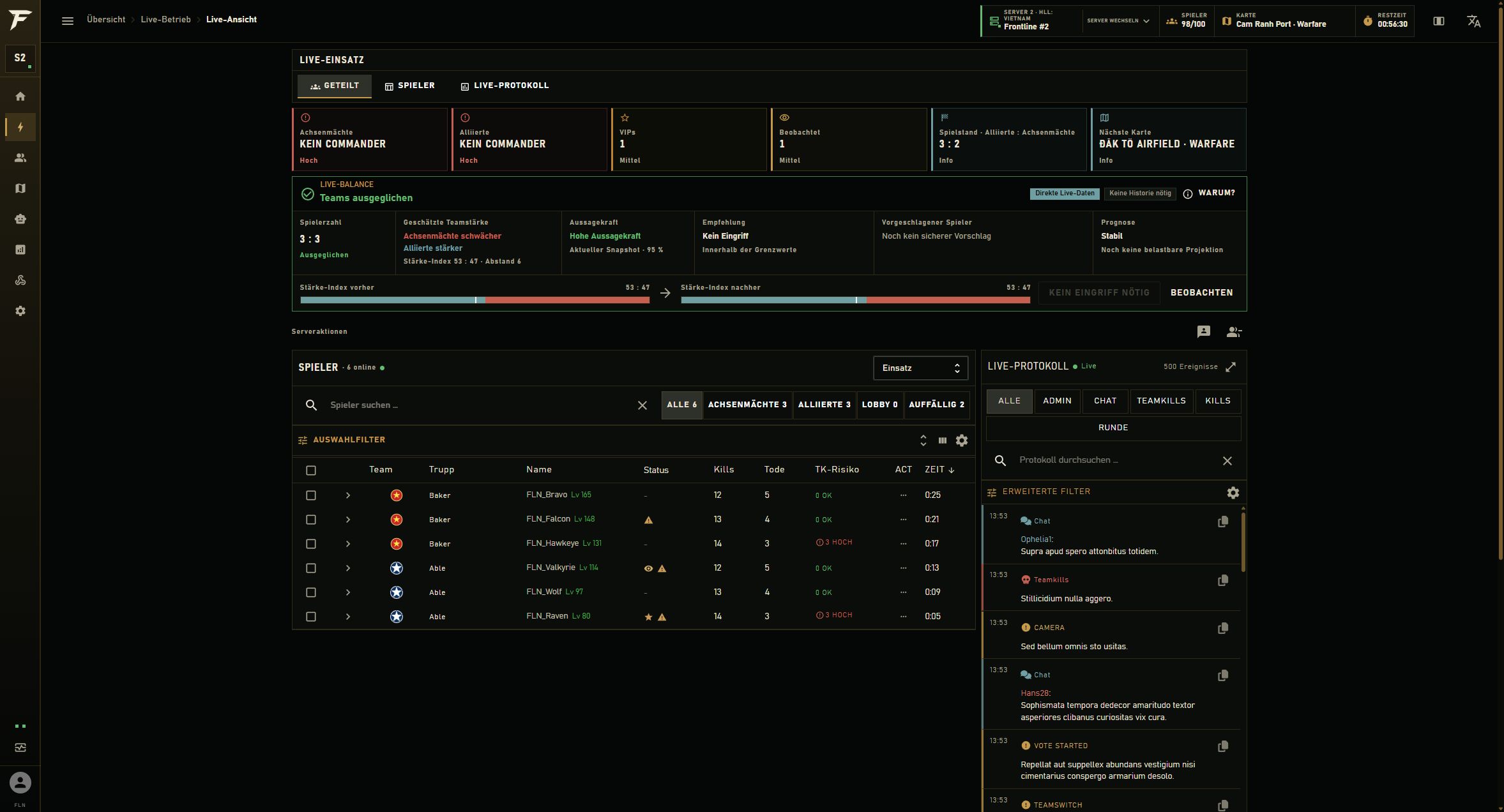
1. Prepare the correct connection details
Ask your gameserver provider which RCON integration is available for your game and server version. You need the designated server address, RCON port and credentials. The game port is not necessarily the RCON port. A publicly listed server address alone is therefore not enough to establish administrative access.
Share passwords only through the secure channel agreed with your provider. Never place them in public Discord channels, screenshots, support posts or this information website. Where possible, restrict network access to the RCON interface to the systems that actually need it.
2. Verify the connection and data freshness
With the managed offer, Frontline provisions the tool instance. Connect the intended gameserver as part of onboarding and check the server selector first. If you manage several instances, every view and subsequent action must clearly identify the server it concerns.
Compare the map, game mode and player count with the actual server. Also check the freshness indicator: visible information can be stale after a connection interruption. Empty or old data is not a reliable basis for intervention. Begin with read-only checks rather than kicking players or changing the map.
3. Assign permissions by responsibility
Separate observation, everyday moderation and technical administration. Someone handling reports does not automatically need permission for permanent bans, map rotation, team changes or account management. Grant additional access deliberately and review it whenever your staff changes.
Live positions and player records may contain particularly sensitive information. Limit access to people who need that information for their role. Use a test role to confirm that the intended views are available and unnecessary actions are not.
4. Introduce rules and notifications gradually
Start with clear community rules and suitable message templates. Enable automods individually and check their effects. Seeding, normal operation and organised events may call for different rules. Available triggers and actions depend on the game, integration and configuration.
Start the autobalancer in observation or shadow mode where available. For Discord integration, first verify the destination channel, responsible moderators and the information actually being shared. Tactical position data does not belong in public channels. Document the test and how to restore the previous configuration.
5. Narrow down connection problems systematically
If a connection fails, check the server address, RCON port, credentials and permitted network connections in that order. If only certain views are missing, also check the role and data available for that game. Missing position data, for example, does not necessarily mean the whole RCON connection is down.
For support, record the time, affected server, visible error and most recently changed setting. Remove passwords, tokens and personal information from supporting material. Avoid changing several settings at once: one traceable test is easier to evaluate and reverse.
Your team checklist
- Correct server and RCON access confirmed
- Map, player count and data age checked
- Observer and moderator permissions tested separately
- Rule wording and Discord destination checked
- Automations tested individually with a documented rollback
Frequently asked questions
Do I need to install the tool on my gaming PC?
Frontline CRCON is operated through a browser. Its server components run in the provisioned infrastructure. Your gaming PC therefore does not have to remain switched on as a management server.
Can I use any port?
No. Use the connection details confirmed by your gameserver provider for RCON access. Ports and technical requirements may vary by game, provider and installation, so this guide does not prescribe a universal default port.
Is setup identical for Hell Let Loose: Vietnam?
The sequence of access, connection checks, permissions and controlled activation remains useful. Available data, maps and actions depend on the particular interface, however. Verify the features required for your actual server.
Who decides on moderation actions?
The community team defines rules, responsibilities and permitted automations. Running the tool infrastructure and taking responsibility for decisions affecting players are separate jobs.
Based on the published Frontline product description. Actual features depend on the game, interface and installation. Check the current offer for pricing and contractual services.
Current offer at FLN